PETAL & MOONHARP / QUICK START
Make the first
few notes.
These instruments are made for Logic Pro running natively on an Apple silicon Mac. Each is built with a macOS 13 minimum; testing on older macOS releases is still needed. Intel Macs, Windows and other hosts are not currently supported.
Install and open
- Save your Logic project and quit Logic. Keep a backup of projects made with earlier versions.
- These downloads are not notarized by Apple. Follow the included manual installation guide, or build from the included source. macOS may block downloaded builds. Use only the normal approval options macOS offers for software you trust; never disable Gatekeeper.
- Open Logic and create a software instrument track. Choose AU Instruments → Pep Instruments → Petal or Moonharp → Stereo.
- If an update is missing, use Logic’s Plug-in Manager to rescan that instrument. The installer guide explains how to avoid duplicate copies.
Make your keyboard yours
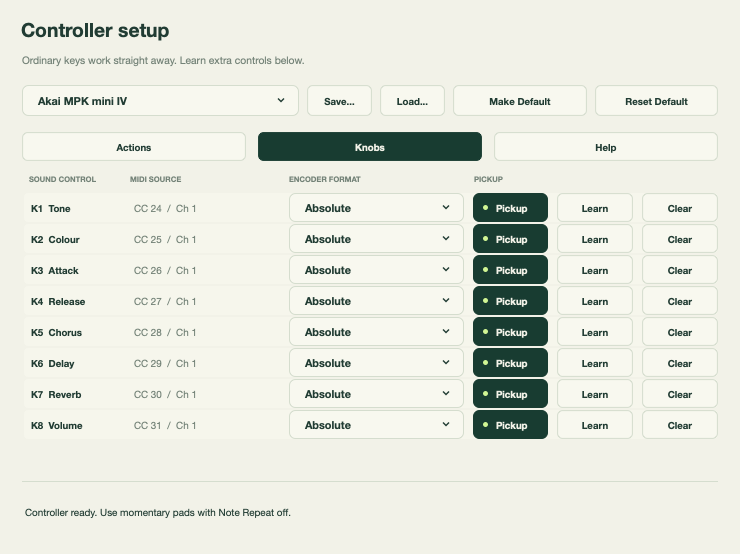
- Click MIDI in either instrument to open controller setup. Generic starts with your ordinary piano keys and leaves pads and knobs unassigned.
- For the captured MPK mini IV layout, choose its profile. Pads send notes 36–43 on channel 10; knobs send CC24–31 on channel 1. Other presets may differ.
- For another keyboard, choose an action, press Learn, and tap your pad. On the Knobs tab, learn each knob the same way. Moonharp also lets you learn a CC for its strum plate.
- Use Pickup for absolute knobs to avoid jumps. Relative encoders need the format used by your controller.
- Save a profile to reuse it; Make Default applies it to new instances. Existing projects keep their own mapping.
Logic combines incoming MIDI. Two controls sending the same note or CC on the same channel cannot be distinguished by the plug-in. Give pads their own channel or reserve notes you do not play. Sustain and MIDI channel commands remain reserved.
Try it out
- Play softly and loudly, change chords, use sustain, then release everything. Listen for stuck notes or clicks.
- In Petal, try one base harmony and one extension. Extensions are exclusive: selecting another replaces the current extension; tapping the active one clears it.
- In Moonharp, choose a chord, sweep the plate and try each rhythm at a few tempos.
- Learn one pad and one knob. Confirm another ordinary key still plays. Clear and relearn that control.
- Record a short MIDI region. Save, close and reopen the project. Confirm sound and mapping are restored.
- Try a bounce and a second instrument instance. Report silence, unexpected sound, poor timing or confusing controls.
Host automation and recorded MIDI should be checked with your workflow. The plug-ins synthesize audio; they do not promise generated-chord MIDI export. Automated validation cannot assess whether playing feels musical on every keyboard.
Send feedbackPep Instruments by Criminal Org Pty Ltd · Keep backups of your projects.